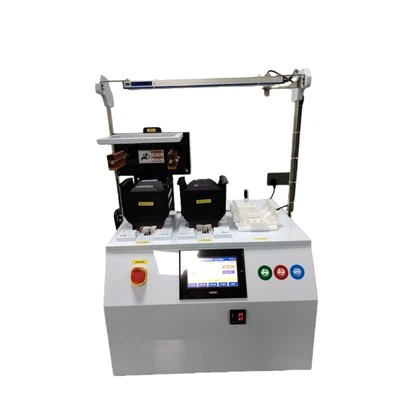
As a supplier of Desktop RTP (Rapid Thermal Processing) Equipment, I understand the importance of being able to view the logged data on this equipment. Logged data provides valuable insights into the performance, efficiency, and overall operation of the RTP system. In this blog post, I will guide you through the process of viewing the logged data on Desktop RTP Equipment, highlighting its significance and offering practical tips.
Understanding the Importance of Logged Data
Logged data on Desktop RTP Equipment serves multiple purposes. Firstly, it allows operators to monitor the real - time status of the equipment. By analyzing the data, they can detect any abnormal behavior, such as temperature fluctuations, pressure changes, or power consumption variations. This early detection enables timely intervention, preventing potential equipment failures and minimizing downtime.
Secondly, the logged data is crucial for process optimization. It provides a detailed record of the processing conditions, including temperature profiles, gas flow rates, and processing times. This information can be used to fine - tune the RTP process, improving the quality and consistency of the processed materials.
Finally, the data is essential for compliance and quality control. In industries where strict regulations govern the manufacturing process, the logged data serves as evidence of compliance. It can be used to demonstrate that the RTP process has been carried out within the specified parameters.
Accessing the Logged Data
The first step in viewing the logged data on Desktop RTP Equipment is to access the data storage system. Most modern Desktop RTP Equipment is equipped with a built - in data logging system that stores the data on an internal hard drive or a removable storage device.
To access the data, you typically need to use the equipment's user interface. This interface can be a touch - screen display or a software application installed on a connected computer. Navigate to the data logging section of the interface. Here, you will find options to view, search, and export the logged data.
Some Desktop RTP Equipment also offers remote access capabilities. This means that you can view the logged data from anywhere using a secure internet connection. Remote access is particularly useful for off - site monitoring and troubleshooting.
Viewing and Analyzing the Logged Data
Once you have accessed the logged data, you can start viewing and analyzing it. The data is usually presented in a tabular or graphical format. A tabular format shows the data in rows and columns, making it easy to read and compare individual data points. A graphical format, on the other hand, provides a visual representation of the data, which can help you identify trends and patterns more easily.
When viewing the data, pay attention to key parameters such as temperature, pressure, and gas flow rate. Look for any sudden changes or deviations from the normal operating range. These could indicate a problem with the equipment or the processing conditions.
You can also use data analysis tools to further explore the logged data. Many Desktop RTP Equipment systems come with built - in analysis tools that allow you to perform calculations, generate reports, and create custom graphs. These tools can help you gain deeper insights into the data and make more informed decisions.
Exporting and Sharing the Logged Data
In some cases, you may need to export the logged data for further analysis or sharing. Most Desktop RTP Equipment systems allow you to export the data in common file formats such as CSV (Comma - Separated Values) or Excel. This makes it easy to use the data with other software applications.
Once you have exported the data, you can share it with colleagues, supervisors, or external partners. Sharing the data can facilitate collaboration and problem - solving. For example, if you are experiencing a problem with the RTP process, you can share the logged data with a technical expert who can help you diagnose and resolve the issue.
Our Desktop RTP Equipment Offerings
As a supplier, we offer a range of Desktop RTP Equipment to meet different needs. Our Low - Temperature RTP Equipment is designed for applications that require precise temperature control at lower temperatures. It is ideal for processes such as semiconductor annealing and thin - film deposition.
Our SiC High Temperature Annealing Furnace is specifically designed for high - temperature annealing of silicon carbide (SiC) materials. It can provide excellent temperature uniformity.
The High - Temperature Oxidation RTP Equipment is suitable for oxidation processes at high temperatures. It offers fast heating and cooling rates, allowing for efficient processing.


Our SiC Epitaxy Furnace is used for the growth of SiC epitaxial layers. It provides a stable and controlled environment for high - quality epitaxial growth.
Finally, our Oxidation and Diffusion RTP Equipment is designed for oxidation and diffusion processes in semiconductor manufacturing. It offers precise control of temperature, gas flow, and processing time.
Conclusion and Call to Action
Viewing the logged data on Desktop RTP Equipment is an essential part of operating and maintaining the equipment. It provides valuable insights that can help you optimize the process, prevent failures, and ensure compliance.
If you are interested in our Desktop RTP Equipment or have any questions about viewing the logged data, we encourage you to contact us for a detailed discussion. Our team of experts is ready to assist you in selecting the right equipment for your specific needs and guiding you through the data viewing and analysis process.